Tuesday, February 24, 2015

Equality / Tolerance

I see this image popping up all over social media stating "'No gays allowed' in Northern Ireland". But, when I click, and read the link, the quote in the headline is nowhere to be found, and neither is a link to the proposal for the amendment to existing equality legislation. Coincidently, for the readers information I don't support the amendment as it stands, nor will I sign *this* petition against it. It is a poor fix to poor legislation, like putting a band-aid on a broken leg.

I wanted to reply to some of these posts on Facebook, but I don't think that would be constructive or profitable as Facebook debates usually end up in a name calling flame war, so I decided to pen my thoughts here. The title of the petition is misleading, and I hope doesn't represent the views of anyone associated with the amendment.

Oh where to start. I am not anti-anybody. I believe everyone has a right to determine right from wrong as they see fit. Everyone has the right to figure out how to live, and to live that way within the constraints of the law. 

I think it is also important to remember that most people do not arrive at any world-view or lifestyle choices lightly, most are considered thoughtfully, even painstakingly, and most are shaped over a lifetime.

It is everyone’s right to act according to the world-view they have arrived at, and live the lifestyle they choose, as long as it is in accordance with the law. Article 9 of the European Convention on Human Rights provides that “Everyone has the right to freedom of thought, conscience and religion...”[1] and I fully support that. Everyone. Not just one group, but all, to the exclusion of no one. So long as it complies with law.

Surely the whole point of freedom of conscience is that you don’t have to be complicit in some act that is acceptable by me, but not acceptable by you. For example if your company prints billboards or T-shirts and I ask you for some slogan that is in opposition to your personal ethos, or your company ethos, then you get to refuse. You are not refusing because of who I am, but because of what you believe, beliefs arrived at through your conscience. My response ought to be to tolerate* your belief, and go find someone else to give my money to.

If however you refuse me because of my political views, gender, ethnicity, religion, sexual orientation etc, then that is a different issue.

But, as I understand it, this is not the core issue in the cases that are driving this debate. The businesses are not discriminating against customers based on who they are, what they believe or how they live. In some of the cases long standing customers have asked for a product that requires someone to produce something, and lend their name to something that is against their beliefs. They have previously served the same customer many times, and have no issue with doing so in the future, the customer is not the issue, but rather their association with the product is.

We must understand that this is mutual; it works both ways, and that sometimes it will cause me a little trouble, but the other side is that I cannot be forced to do something which is against my personal conscience. This applies to the big things and the small - whether I'm asked to print a billboard, or participate in of facilitate the abortion of a baby.

The real issue comes down to one question that we all have to ask and answer: “will you tolerate* me?”

*tolerate: allow the existence, occurrence, or practice of (something that one dislikes or disagrees with) without interference

If you feel the need to comment, please do so, but if you disagree with what I've said, can I ask that rather than attacking me, you criticise my ideas, and that way we can have a constructive conversation where we all might learn, rather than just a mud slinging session?

[1] http://www.equalityhumanrights.com/sites/default/files/documents/humanrights/hrr_article_9.pdf


Wednesday, October 22, 2014

Whatever you've heard about me, it's not the whole truth - I am worse.

I've heard some things about me from various sources recently and I didn't like them. But whatever you've heard, it's not the worst.

This quote from Spurgeon sums up how to think about the charges against me:
“Brother, if any man thinks ill of you, do not be angry with him; for you are worse than he thinks you to be. If he charges you falsely on some point, yet be satisfied, for if he knew you better he might change the accusation, and you would be no gainer by the correction. If you have your moral portrait painted, and it is ugly, be satisfied; for it only needs a few blacker touches, and it would be still nearer the truth.” – Charles Spurgeon.

Depravity - The Bible makes my wickedness very clear. Genesis 6:5 says "every inclination of the thoughts of the human heart was only evil all the time". I was born with a desperately wicked heart (Psalm 51:5). I have no merit of my own. Any charge you can find to bring against me, there is worse available. Much worse.

Propitiation - my favourite word (a life saver). When God calls me to Himself with a repentant heart, in simple faith, the eternal wrath of a Holy God has been removed, He has absolutely no record of anything ever having gone wrong in my life, and I am restored to relationship with Him, and treated as a son, irreversibly, and for ever (Titus 3:7).

Praise the God of restoration, praise the God who gives, and takes away. Let me always walk through life "sorrowful, yet always rejoicing" (2 Cor 6:10). I will always have sorrows, that is a fact of life, and yet in Christ I always have much more cause for rejoicing. Praise God that through these tough times he drives me closer into fellowship with other believers, and closer to the foot of his Throne in humble dependence on Him, and Him alone.

Praise Him that he continues to work through broken vessels, like me.


http://www.vergenetwork.org/2014/10/20/practical-tools-for-exhorting-one-another/
(Spurgeon quote came from this very helpful article)

Thursday, October 09, 2014

Jehovah's Witnesses visit our home

Please note this post is descriptive, not prescriptive. I am not advising anyone to do this, I am simply describing what I did. Inviting well versed people from a cult into your home is not a safe thing to do. It could go badly wrong. But, in this case it didn't and although they said stuff I had no good answer to, I know this will only drive me deeper into the word, and into the doctrine I have come to believe. It will make my foundations more sure, and not weaken them.

Last Saturday I had a knock at the door, and it was two well dressed ladies from the local Jehovah's Witnesses. After thinking about how to deal with this encounter, and how I should prepare for it, well, here it was and I was unprepared. But, the opportunity was in front of me, so I asked them in. They said they couldn't, but they would come back another time, so I said that would be grand.

Well, last night they arrived again. It was one of the ladies, and her husband. I had done some reading, some listening, and some learning, but in my heart I really didn't want to pummel them with 2nd hand information as that seems a bit unfair. Better to deal with them as who I am, and from where I am. I am confident in my own faith, I am confident in my own theology, poor and all as my knowledge is. I know what I believe, even if I haven't got the basis for everything at hand.

So, they came in. And sat down. And we sort of looked at each other. I was expecting a pummelling with the standard JW speel, but that didn't come. So I told them that I don't think it is fair to fully form opinions on other communities without actually knowing anyone personally. So the guy started to explain some of the differences between what they believe and what 'Christians' believe.

He started with the Trinity, just giving an overview of their perceived roles of Jesus, God and the Holy Spirit. Then they told of how they don't give blood and the old testament background of that. They mentioned that they believe in Jesus, which they say surprises some people, they said they have even had people tell them they don't believe in Jesus. I do understand this as it seems they believe in a significantly different version of Jesus, but I was able to empathise with people telling me what I do or don't believe. They explained how they don't believe in hell. I listened interested, and attentively to all they had to say, asking for clarification many times throughout.

It is difficult to know where to start with something like this, but I knew Jesus talked a lot about hell, so I started by checking with them that they agreed that the entire Bible was the inspired word of God, and that it was an infallible source of information  They agreed. Phew. We talked about a few references to hell, and they explained that they believe that it is just a second death, which is final, and is an annihilation  a final end. To me this idea is quite attractive  as I think I often don't have a proper appreciation for the seriousness of sin, and the punishment it requires. Anyway, we went through a few texts, which embarrassingly they helped me to find from my poor Biblical knowledge. One by one they were knocking them down, as it was possible to read them all through the lens of annihilation  However we got to the words 'eternal fire' in Matthew 18:8 "And if your hand or your foot causes you to stumble, cut it off and throw it from you; it is better for you to enter life crippled or lame, than having two hands or two feet, to be cast into the eternal fire," The word eternal there signifies that it will be a punishment forever, not just temporary. It is not simply the fire that is eternal. Well, that was the best I could come up with, but I later found Rev 20:10 which is better: "And the devil that deceived them was cast into the lake of fire and brimstone, where the beast and the false prophet are, and shall be tormented day and night for ever and ever" not so ambiguous. Anyway, we can keep that one for next time.

Then we gradually worked our way around to works-based faith, and lack of assurance. I find it sad that their reading of the Bible cumulates in a lack of assurance, and it ends up a bit of a lottery as to whether you have done enough to please God. Anyway, i took them through various texts about the finished work of Christ, and about once for all, and so on. They brought up James, "faith without works", and I told them I agreed. But I told them that cause and effect are the other way around from what they believe. They believe that doing good works helps with their prospects of salvation. I explained that when a person is 'born again' or renewed, they repent of their old way of life (sins) and their heart and desires are changed, some instantly, some over time, but that is the actual moment of salvation. "There is now no condemnation" from that point on.

I explained this again with the old testament story of the two women who bring the baby to Solomon. He says cut it in two, and give the women half each - which causes one of the women to shout out, and say that the other could have the child. Now, here is a classic example (the best I know in fact) of an outworking of something hidden. The shout did not make the women the mother of the child. She was already the mother before that, but it wasn't possible to discern that fact visually, outwardly. The woman did not shout to become the mother of the child, she shouted because she already was the mother. She was the mother long before the dispute arose. In the same way we do not do good works to gain God's favour, but we do good works because we already have gained his favour. The works are an outward sign of an inward change that has already taken place. The JWs said they had never heard it explained like that before, and hadn't thought of it like that. For this I thank God, and pray that they will ponder this.

We also talked about true and false conversion, and how hating sin is a sign of true conversion, and about how it says that many will hear 'I never knew you'.

The conversation was gracious from both sides (I hope!) and I felt while it seemed that we agreed on some things we cam to an amicable disagreement on others. This is exactly how dialogue like this should go. Praise God.

We talked for about 2 hours in total, and covered many other topics too.

They said some interesting things, like about how little engagement they actually receive on the doorsteps. They said it was rare, and actually a bit scary to get invited into a home. They said it was unusual to meet a family (Susan and the kids were in the room for most of the time) who were devoted to and convicted by their Christian beliefs. They also said it was nice to discuss these things, rather than having people ram stuff down their throats - funny how they are scared of the same things that others fear about them!

At the end, when they left I felt it had went well. It wasn't as intimidating as I had expected  Although they clearly knew their doctrine much better than I did, they didn't know everything  and admitted it. They were just ordinary people.

I thank God for the help He gave me during this visit. He did not give me all the right texts, He did not instantly give me all the right answers, but through the faith He has given me, He helped me to show them what a genuine follower of Jesus Christ looks like, warts and all. All I can do now is pray that some of my foolishness will be turned into wisdom in their minds, by the one who created all things from nothing. I think that sounds quite feasible.


Monday, August 25, 2014

Kitesurfing - 25th August 2014

There is no kitesurfing for 6 months, and then 3 nights in less than a week. Tonight was east wind, which I'm not fond of, seemed quite strong when I got there, so I set up the 9, but it was clearly not enough, so I set up the 12.

Out on the water for a good while, mowing the lawn at the start, but working on toeside and even some powered jumps in the right to left direction.

There were almost no breaking waves, but it was odd on the way out, it was like constantly riding over a sine wave, which was actually quite tricky to do. It reminded me a bit of Magilligan point, in the mouth of the Foyle.

The best thing of all was getting to surf through the sunset, at about 8:40pm or so. Lovely.

Friday, August 22, 2014

Kitesurfing - Fri 22nd Aug 2014

Another night's kiting this week! Tonight I did a big downwinder from the mouth of the beach (Benone) to the river.

The wind was great, and the waves made better ramps than Tuesday night. I was going well, it seemed to blow up a bit as we went back up the beach to start again, and when I got back to the starting place, the wind dropped.

I tried, but I failed, the kite went down, wet, little wind, trouble relaunching, so I quit. Kite was soaked, and I was a bit disappointed. Maybe another time :/

Tuesday, August 19, 2014

Kitesurfing - Tuesday 19th August 2014

Tonight's forecast has been good, so even after a pre-6am start I decided to take a short run to the beach tonight.

It was well worth it, the wind was a good westerly direction, although the ramps weren't there as much as I'd like them to be.

I was a bit worried about the whole thing, as it is many months since I've been out, but the mice hadn't eaten my kite, I remembered where the blue and red lines went, and I also seemed to manage to kitesurf without undue amounts of falling in.

A grand evening out.

Tuesday, May 13, 2014

Marriage

I read this quote and it hit me hard: 
"I did not love my wife as Christ loves the church; instead of laying down my life for her,
 I wanted her to lay her life down for me."


Saturday, April 05, 2014

Tunnelling VNC (or anything) over ssh

To set up a tunnel to reach a vnc server running on port 5901 of remote_host, it is possible to tunnel the port over an ssh connection. Then you just connect to localhost:5901 

ssh -C -L 5901:localhost:5901 -N -f -l remote_user -p 22 remote_host

So that is:
ssh -C -L local_port:localhost:remote_host_port -N -f -l remote_user -p 22 remote_host

Friday, March 28, 2014

c# update clock display once per second

For my heating controls project I display a clock on my main screen. It is just a label which I set the time in. Previously I had used a System.Threading.Timer with an interval of 50ms to do the updates, and this works fine, but on mono on the Raspberry Pi it takes up too much CPU. Top was showing that the process was taking 8-10% of the CPU when at idle.

The problem is that if you set a timer to run every 1000ms, sometimes expirations will be slightly longer, meaning that if you watch the clock every now and then it will skip displaying a second. If you go for something like 900ms update, that doesn't work either, you get 9 short seconds and one long one.

Googling turned up this stackoverflow article, and it contains the answer that got me started, but I wanted it to be a little more versatile. I wanted a timer that I could configure to fire every 'x' ms, and I could either set it to 1000, for each second, or if that was still too CPU hungry I could set it to 60000, which would only update the clock once per minute.

In my form_load I initialise the timer.

            clockUpdateTimer = new System.Timers.Timer();
            clockUpdateTimer.Elapsed += clockTimer_Elapsed;
            clockUpdateTimer.Interval = 100;
            clockUpdateTimer.Start();

I set the initial interval to 100ms which means my clockTimer_Elapsed() method gets its first call pretty much straight away.


        private long updateMainScreenIntervalMs = 1000;

        private void clockTimer_Elapsed(object sender, System.Timers.ElapsedEventArgs e)
        {
            clockUpdateTimer.Stop();
            TimerCallback(sender);
            //start the timer to run until 200ms after the next clock second boundary
            long timeInMs = System.DateTime.Now.Ticks / TimeSpan.TicksPerMillisecond;
            long wait = (updateMainScreenIntervalMs * (timeInMs / updateMainScreenIntervalMs + 1)) - timeInMs;
            //Debug.WriteLine("wait ms: " + wait);
            clockUpdateTimer.Interval = (int)wait + 200;
            clockUpdateTimer.Start();
        }

This method firstly stops the existing timer, and then calls my callback method to update the label (TimerCallback()). Next I get timeInMs which is the current system time in milliseconds. Then I do some maths which essentially finds the nearest full cycle of time, and subtracting the current time from this value figures out how long we have to wait until this time. 
Then I start the timer with that time. For a 1 second interval it typically waits about 750ms. 

Any improvements welcome, if it helps you please post a comment!

Kitesurfing - Friday 28th March 2014

I got to Benone just after an early exit to work, so I was there for about 4:20. It was blowing about 25 on my wind meter, so I set up the 9. However, after a couple of runs showed me that it was too small. The 12 was too big, but I'd rather be overpowered than underpowered.

It was a great session, long flats, nice waves. The only funny thing was the direction was East, which meant I was going the opposite way to normal, but it was still good practice, and it meant that I was able to ride a little toeside out over the breaking waves.

The water is still cold, and it felt even colder when I took my wetsuit socks off, feet were freezing, but at least I could feel the board. I really don't like having something on my feet, I find it very tricky.

Monday, March 24, 2014

Heating Touchscreen Screen Captures

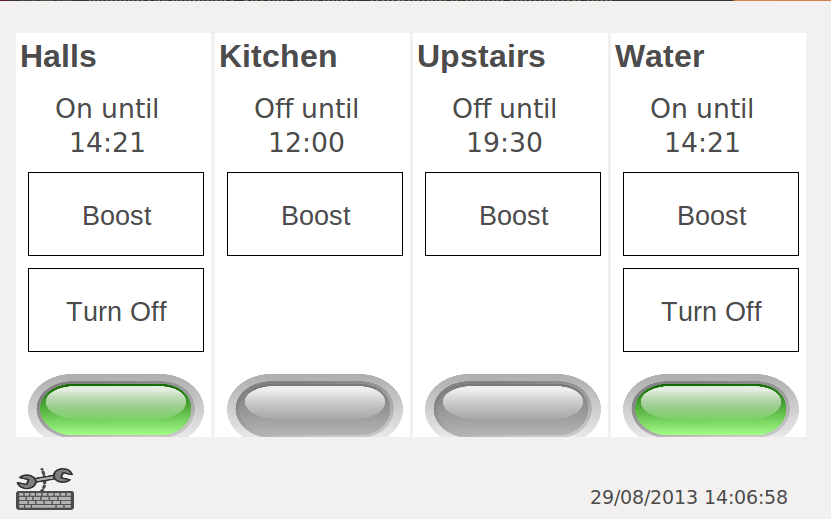
I have made a few updates to my touchscreen client, and one of those has been a bit of work on the visual aspect. A few screenshots are posted below. (the windows are all border-less on mono, but display with borders for debugging on Windows)


Main Screen


PIN input form


Program Entry


Time entry for a specific program


System settings dialog (not themed)

Wednesday, March 12, 2014

How to hold modules from apt-get update

Recently I had to do an update, but the bootloader update broke my touchscreen driver. So I wanted to do an update without updating the bootloader, so I had to run this command:

 sudo apt-mark hold libraspberrypi-bin libraspberrypi-dev libraspberrypi-doc libraspberrypi0 raspberrypi-bootloader

Tuesday, December 24, 2013

Win32 Disk Imager - when the image is too big (Raspberry Pi)

When attempting to use Win32 Disk Imager put a 4Gb image onto a different 4Gb memory card, I got this error


"Not enough space on disk: Size 7809024 sectors Available: 7744512 sectors Sector size: 512"

So basically the 4Gb cards have a slightly different size. What I have here is a workaround, and it's definitely not guaranteed to work, but it may be worth a try. Get yourself a Ubuntu computer (I just boot a laptop from a live CD) and run these commands (changing paths where appropriate):

1) Run dd to copy as much of the image as possible to the SD card - this takes quite a while to complete, depending on the write speed of your card. I think for me it took about 15 minutes, and it prints no status until it fails - (update with status=progress at the end of the line in a modern version of dd, it will show progress on the console)

ubuntu@ubuntu:/$ sudo dd if=/media/ubuntu/62B85E4EB85E2139/Downloads/2013-09-02-deployed\(RC3\).img of=/dev/mmcblk0 status=progress
dd: writing to `/dev/mmcblk0': No space left on device
7744513+0 records in
7744512+0 records out
3965190144 bytes (4.0 GB) copied, 1914.1 s, 2.1 MB/s

2) Run fsck to see what size your physical device is.

ubuntu@ubuntu:/$ sudo fsck.ext4 /dev/mmcblk0p2
e2fsck 1.42.5 (29-Jul-2012)
The filesystem size (according to the superblock) is 960768 blocks
The physical size of the device is 952704 blocks
Either the superblock or the partition table is likely to be corrupt!
Abort? yes

3) Run resize2fs to change the superblock size to match the physical size (you need to replace 952704 with whatever output you got from step 2)

ubuntu@ubuntu:/$ sudo resize2fs /dev/mmcblk0p2 952704
resize2fs 1.42.5 (29-Jul-2012)
Resizing the filesystem on /dev/mmcblk0p2 to 952704 (4k) blocks.
The filesystem on /dev/mmcblk0p2 is now 952704 blocks long.

4) You're all set - run fsck again to see a good printout, and then pop your card into your pi and it *should* boot!

ubuntu@ubuntu:/$ sudo fsck.ext4 /dev/mmcblk0p2
e2fsck 1.42.5 (29-Jul-2012)
/dev/mmcblk0p2: clean, 78371/245760 files, 622522/952704 blocks


I understand that this works by truncating the filesystem, in the blind hope that the end of the filesystem has nothing written to it, and is therefore only empty space anyway. Like I said there is the possibility for this to go wrong, YMMV.

Friday, October 04, 2013

eGalax USB touchscreen power consumption problem on Raspberry pi

I have deployed my eGalax touchscreen in production now, but I encountered a problem where very rarely the touchscreen would stop responding to touch input. I noticed errors like this in the logs:

/var/log/messages
lots of lines like:
Sep 20 09:42:42 hall-heat kernel: [759582.629937] usb 1-1.3: Manufacturer: eGalax Inc.

Sep 20 09:42:42 hall-heat kernel: [759582.641175] usbtouchscreen: probe of 1-1.3:1.0 failed with error -32
... [and ]...
Sep 20 09:42:44 hall-heat kernel: [759584.833718] usb 1-1.3: USB disconnect, device number 90
Sep 20 09:42:44 hall-heat kernel: [759585.070521] usb 1-1.3: new low-speed USB device number 91 using dwc_otg
Sep 20 09:42:45 hall-heat kernel: [759585.530595] usb 1-1.3: new low-speed USB device number 92 using dwc_otg
Sep 20 09:42:45 hall-heat kernel: [759585.990652] usb 1-1.3: new low-speed USB device number 93 using dwc_otg
...

and in /var/log/syslog
Sep 20 09:39:55 hall-heat kernel: [759416.317257] usb 1-1.3: new low-speed USB device number 18 using dwc_otg
Sep 20 09:39:56 hall-heat kernel: [759416.426528] usb 1-1.3: New USB device found, idVendor=0eef, idProduct=0001
Sep 20 09:39:56 hall-heat kernel: [759416.426558] usb 1-1.3: New USB device strings: Mfr=1, Product=2, SerialNumber=0
Sep 20 09:39:56 hall-heat kernel: [759416.426577] usb 1-1.3: Product: USB TouchController
Sep 20 09:39:56 hall-heat kernel: [759416.426592] usb 1-1.3: Manufacturer: eGalax Inc.
Sep 20 09:39:56 hall-heat kernel: [759416.435420] input: eGalax Inc. USB TouchController as /devices/platform/bcm2708_usb/usb1/1-1/1-1.3/1-1.3:1.0/input/input115
Sep 20 09:40:04 hall-heat kernel: [759424.789468] usb 1-1.3: USB disconnect, device number 18
Sep 20 09:40:11 hall-heat kernel: [759431.427539] usb 1-1.3: new low-speed USB device number 21 using dwc_otg
Sep 20 09:40:11 hall-heat kernel: [759431.767454] usb 1-1.3: new low-speed USB device number 22 using dwc_otg
Sep 20 09:40:11 hall-heat kernel: [759431.847452] usb 1-1.3: device descriptor read/64, error -32
Sep 20 09:40:11 hall-heat kernel: [759432.217494] usb 1-1.3: new low-speed USB device number 23 using dwc_otg
Sep 20 09:40:12 hall-heat kernel: [759432.597579] usb 1-1.3: new low-speed USB device number 24 using dwc_otg
Sep 20 09:40:12 hall-heat kernel: [759432.677575] usb 1-1.3: device descriptor read/64, error -32
Sep 20 09:40:13 hall-heat kernel: [759433.477560] usb 1-1.3: new low-speed USB device number 25 using dwc_otg
Sep 20 09:40:13 hall-heat kernel: [759433.557573] usb 1-1.3: device descriptor read/64, error -32
Sep 20 09:40:13 hall-heat kernel: [759433.747461] usb 1-1.3: device descriptor read/64, error -32
Sep 20 09:40:49 hall-heat kernel: [759469.502121] ERROR::dwc_otg_hcd_urb_enqueue:514: Not connected
Sep 20 09:40:49 hall-heat kernel: [759469.502121] 
Sep 20 09:40:49 hall-heat kernel: [759469.502160] phy0 -> rt2x00usb_vendor_request: Error - Vendor Request 0x06 failed for offset 0x131c with error -19.
Sep 20 09:40:49 hall-heat kernel: [759469.738105] usb 1-1: USB disconnect, device number 2
Sep 20 09:40:49 hall-heat kernel: [759469.738135] usb 1-1.1: USB disconnect, device number 3
Sep 20 09:40:49 hall-heat kernel: [759469.738457] smsc95xx 1-1.1:1.0: eth0: unregister 'smsc95xx' usb-bcm2708_usb-1.1, smsc95xx USB 2.0 Ethernet
Sep 20 09:40:49 hall-heat kernel: [759469.750967] usb 1-1.2: USB disconnect, device number 4
Sep 20 09:40:49 hall-heat kernel: [759470.278132] Indeed it is in host mode hprt0 = 00021501
Sep 20 09:40:50 hall-heat kernel: [759470.738290] usb 1-1: new high-speed USB device number 28 using dwc_otg
Sep 20 09:40:50 hall-heat kernel: [759470.738792] Indeed it is in host mode hprt0 = 00001101
Sep 20 09:40:50 hall-heat ifplugd(eth0)[1701]: Exiting.


As my main pi was now in production, I am using a really old Model B as my development environment. I noticed that if I power it up with the USB plugged in that it fails to boot with an error and corrupts the SD card, so that no further boots are possible

From a lot of googling I pieced together that it was a power issue - the USB touch controller, although it's only a tiny board, it seems to draw quite a lot of current from the USB port of the pi, which has occasional problems with my new pi, and very regular problems with the older model.

I bought one of these cables from linitx (http://linitx.com/product/5v-power-injector-for-usb-on-rb411uahr-and-rb493g) which allows power to be injected through the USB.
5V Power Injector for USB on RB411UAHR and RB493G
After receiving it I got my tester out and was disappointed to find that it still had the 5V line connected through. So I stripped off the insulation, and began to cut wires, thinking it would be a red one, however in this cable it turned out to be the black one. Coincidentally I ordered another one, and it turned out to be the red wire, so do some testing before you do any cutting.

I installed my new cable in my old Model B test system, and booted it up - perfect! This instantly solved the problems.

So, if you see problems at boot, or have problems with USB devices failing after some time, think power.

Monday, September 30, 2013

Raspberry Pi - turn off HDMI after a specified period of time using xscreensaver

for my application I've set up xscreensaver ('sudo apt-get install xscreensaver' and reboot, use 'xscreensaver-demo' to configure it) to blank my 7" eGalax touchscreen after 10 minutes, but when it's left unattended for 12 hours the backlight is still on. The screen sleeping options don't work in xscreensaver, so I rolled my own solution.

I'd appreciate suggestions if it isn't the best solution. It should work for others too.

Step 1 - Create scripts that manually turn off and on the HDMI

- create file hdmi_off.sh
CODE: SELECT ALL
#!/bin/sh
#hdmi_off.sh - shell script to turn HDMI off - should work universially
tvservice -o


- create file hdmi_on.sh (make sure to set executable permissions on both - 'chmod 755 *sh')
CODE: SELECT ALL
#!/bin/sh

#hdmi_on.sh - custom script to turn HDMI on

#get the current tv state
tvstate=`tvservice -s | grep HDMI | wc -l`

#only turn on if its not already on
if [ "$tvstate" -eq 0 ]
then
   tvservice --explicit="DMT 87"
   fbset -depth 8
   fbset -depth 16
   xrefresh
else
   echo "HDMI already on";
fi

exit;


You should make sure these scripts work from the command line for you - all my other script does is call them, so if these do not work it will not work. Stop here until you get them working. You'll have to search the forums to find how to make your screen come on, and start displaying stuff.

Step 2 - Create a perl script to detect the screensaver state

Basically we can use "xscreensaver-command -watch" to follow text output of what xscreensaver is doing. What I do is detect when the screensaver becomes active, then start a timer to determine when to turn the screen off. It is a lot simpler if you just want the screen to power off immediately. But I wanted this dual off approach as it takes the screen longer to come on when its fully off.

CODE: SELECT ALL
#!/usr/bin/perl

#check_screen_state.pl - perl script to monitor screen state, and turn HDMI on or off
use strict;
use warnings;
use threads;
use Thread::Queue;
$|=1;

my $counter=-1;
#time in seconds
my $time_to_power_off_screen = 1200; #20 minutes
my $hdmi_off_command = "/home/pi/screensaver/hdmi_off.sh";
my $hdmi_on_command = "/home/pi/screensaver/hdmi_on.sh";

#code to run a shell command in a thread, and get output from it
sub pipeCommand {
    my $cmd = shift;
    my $Q = new Thread::Queue;
    async{
        my $pid = open my $pipe, $cmd or die $!;
        $Q->enqueue( $_ ) while <$pipe>;
        $Q->enqueue( undef );
    }->detach;
    return $Q;
}

my $pipe = pipeCommand(
    'xscreensaver-command -watch |'
) or die;

print_("Starting, waiting on input.\n");
while( 1 ) {
    if( $pipe->pending ) {
        my $line = $pipe->dequeue or last;
        print_("$line");
      if ($line =~ m/^(BLANK|LOCK)/) {
         $counter = $time_to_power_off_screen;
      } elsif ($line =~ m/^UNBLANK/) {
         if($counter <= 0){
            print_( "turn on\n");
            print_( `$hdmi_on_command `);
         }else{
            print_("screen already on\n");
         }
         $counter=-1;
       }
    }
    else {
        sleep 1;
      if($counter >0){
         $counter--;
      }
    
      if($counter == 0){
         $counter=-1;
         print_( "turn off acter $time_to_power_off_screen seconds\n");
         print_(`$hdmi_off_command`);       
      }
    }
}

sub print_{
   print "[".localtime(time) .  "] @_";
}


Step 3 - make the script run all the time

Make an inittab entry to make the perl script run all the time ('sudo vi /etc/inittab' and add the line to the bottom
CODE: SELECT ALL
hdmi:2345:respawn:/usr/bin/perl /home/pi/screensaver/check_screen_state.pl > /home/pi/screensaver/hdmi.log

Save the file, exit the editor, and then type 'sudo init q' to make the system re-read the file. 'ps -ef' should now list your script.

Wednesday, September 18, 2013

Heating control weather compensation

This time of year the temperature can vary widely in the mornings. Some mornings it can be 13/14 degrees, in which case there is no need for heating, and other days it can be well below 10, which can be pretty chilly!

I decided to have a quick go at a bit of simple weather compensation for my heating control system. Rather than adding it into my server software I decided to write a simple perl script that acts as a client.

First thing is to scrape the temperature from wunderground.com. Using lynx and getting the text in perl is easy.

Then for getting the programs into the server, I considered various complicated options, but then I thought of having a couple of pre-cooked programs based on temperature ranges. So in my script I determine which of 3 ranges it is in, currently less than 3 degrees, 3-9, 9-13 or 13+ and send a set of commands to the server based on the outcome.


use strict;
use warnings;

use Net::Telnet;
use Data::Dumper;

my $host = "localhost";
my $port = 2349;

$|=1;


my $command = "lynx  --dump http://www.wunderground.com/q/zmw:00000.1.WEGAE";

print "Retrieve weather data...";
my $current_weather = `$command`;
print "\n";


#use the feels like temperature
#   Feels Like 12 °C
#   Feels Like 12.5 °C
my $temp = -99;
if(($temp) = $current_weather =~ /Feels Like\s+(.*?)\s+/){
 print "Temperature is $temp\n";
 if($temp > 13){
  print "temp too high, doing nothing\n";
 } elsif ($temp > 9) {
  #warmest programs
  send_programs("p_warm.txt");
 } elsif ($temp > 3) {
  #medium
  send_programs("p_medium.txt");
 } else {
  #coldest temp program
  send_programs("p_cold.txt");
 }
}


sub send_programs{
 my ($file) = @_;
 print "About to use data from file $file \n";
 
 my $t    = new Net::Telnet( Timeout => 5, Dump_Log => "dump.log.filename.txt" );
 $t->open( Host => $host, Port => $port );
 $t->put("ClientName Perl Weather Compensation ($temp)\n");
 
 open(IN, $file) || die "cant read file $file : $!";
 while(my $line = <IN>)
 {
  chomp $line;
  #replace multiple spaces with singles
  $line=~s/\s+/ /g;
  print "send: $line\n";
  $t->put("$line\n");
 }
 
 
}


Thursday, September 05, 2013

Raspberry pi boot straight into a GUI application

I wanted the pi to automatically start x and run my mono application but I don't need a pile of menus etc, so I googled a bit, but couldn't find an article that really did what I want.

I followed the instructions in this article with some additions.

Step 1: add startx to /etc/rc.local

#/etc/rc.local
sudo -u pi startx &
Step 2: allow non-interactive processes to launch an X server
sudo dpkg-reconfigure x11-common
(and select Any User)

Step 3: add your application to ~/.xinitrc
I deviated here a bit, to run my mono app I wrapped it in a perl script, which monitors STDOUT and STDERR because I found that there can occasionally be exceptions which cause the program to stop being displayed, but the mono process does not exit. I monitor the output for /exception: read failure/i and if it is in the output, I kill the process and start another. I'll post the script if anyone wants it.

These steps are enough to start x and run my app, but its actually pretty much the same as running the standard LXDE with an autostart entry.

Step 4: Change the x-session-manager
sudo update-alternatives --config x-session-manager
 I selected the option /usr/bin/openbox-session which provides a much more minimal x-session.

Step 5: Add a startup background
I discovered that x starts pretty quickly, but it leaves the background black for quite a while before it begins to draw my application. So I want to display a png file in the background while my app is starting.
sudo apt-get install feh
 feh can be used to display an image, so I just added it to my xinitrc file
#~/.xinitrc
export DISPLAY=:0
xscreensaver -no-splash &
feh  /home/pi/images/starting_background.png &
/home/pi/mono/Debug/runGUI.pl

Now almost as soon as the screen goes black, it displays my waiting image.


Step 6: remove the normal raspi-config start x

Finally run raspi-config, and change the pi so it doesnt automatically try to start x through the init method.
sudo raspi-config

Conclusion

This solution works perfectly for me, I don't mind some text scrolling on startup, but I know there are ways to get rid of that too.  Now there is no overhead of menus etc, and the only app running in the GUI is mine. Job done.

Raspberry pi mono hide cursor

It seems to be quite a common problem getting the cursor to hide in an application running on x-windows. The mono implementation of c# winforms doesn't currently support Cursor.Hide() functionality at all.

I began by using unclutter which monitors the x-display and hides the cursor very quickly after any movement, but it is still visible, and if the CPU is busy it can be visible for some time.

However, an article from microsoft helped me solve it. I downloaded a blank cursor file from some random website, and added the blank.cur to my project as an embedded resource. This code which I placed in my form_load method then replaces the normal cursor with the blank one:
            this.Cursor = new Cursor(GetType(), "blank.cur");  

Easy, and very effective for my fullscreen touchscreen mono app running on my 7" eGalax touchscreen from the raspberry pi.

Raspberry Pi Hall Heating Controller

Introduction


About six years ago I created and installed a proprietary system for controlling our central heating. The setup was client-server, where the server was C# software running on a Win32 box, using RS232 to control a VIOM unit, which in turn activated relays to turn the zones on and off. There is no thermostatic control in this software, it is simply time based on/off programs. The main aim was to make a piece of software that would allow easy setting of time programs.


A few months ago I decided to rewrite my software for the pi. I did a little research to make sure that the pi could do all I needed, which is basically a bit of I/O and run 24/7, reliably. This has been running now for a few months without any problem.

A new application – Church hall


I noticed another application in that our local church hall has an outdated clock based heating system. In this system there are four zones, configured by switches that are inaccessible to users, and therefore mostly set to on. The timing is handled by one timer which controls all zones together. This sounds like an application that could be dramatically enhanced by my existing software.

GUI


At home I have no need for a display, as there are LEDs for system status, and a windows PC based GUI for program setting. In this new location I would need to create some sort of GUI to display on the unit.

I found eGalax touchscreens on eBay which could be bought from China for about £50. I ordered one and using some instructions I got the touchscreen configured and working. After some deliberating around JavaFX I decided that my simplest solution would be to go for another WinForms application, running on the pi using mono. I wrote a really simple WinForms app and put it onto the pi, with mono SimpleApp.exe up it popped on the display. Over a few iterations I tested some button handlers, and also TCP/IP code to connect to my java server software, and it all worked as expected.

When I discovered mono worked so well I took the bold approach of just linking to my existing classes for communication and programming used in my regular WinForm application, which have built-in resilience if the server goes down, useful enums, and code for handling all the time programming required. I was pleased to see that it all worked.

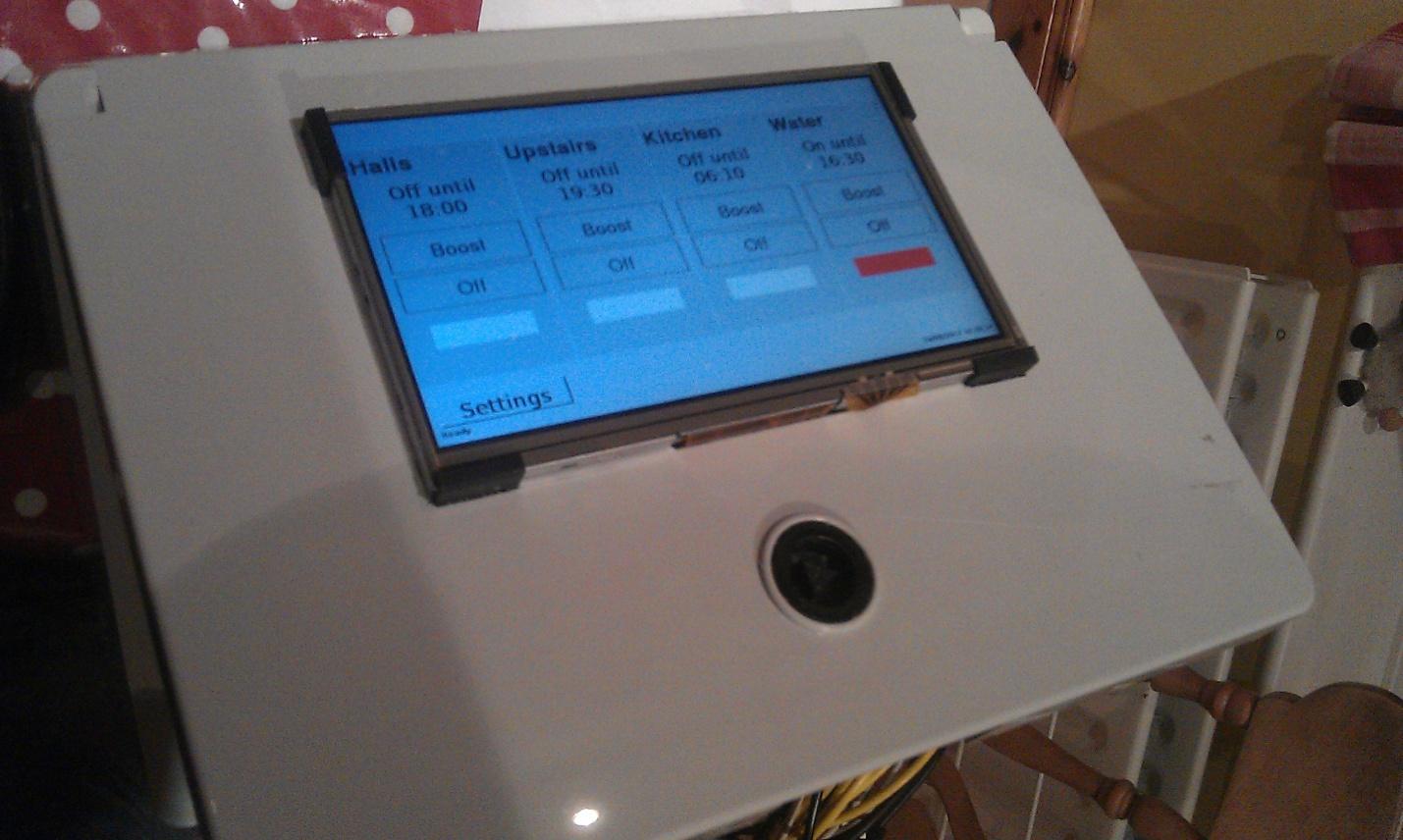
With the mechanics in place, it came to the more difficult aspect of designing the GUI. I went through quite a few iterations on paper to decide what was required on the screen, and how it should be laid out, and in the end decided that there should be four horizontal panels side-by-side, one for each zone. I would stick with my familiar paradigm of displaying the zone name at the top, and then text showing if the zone is on or off, and what time the next event is at. Below this is a button to boost and a button to turn off. At the bottom there is an image which shows grey when the zone is off, and green when it is on.


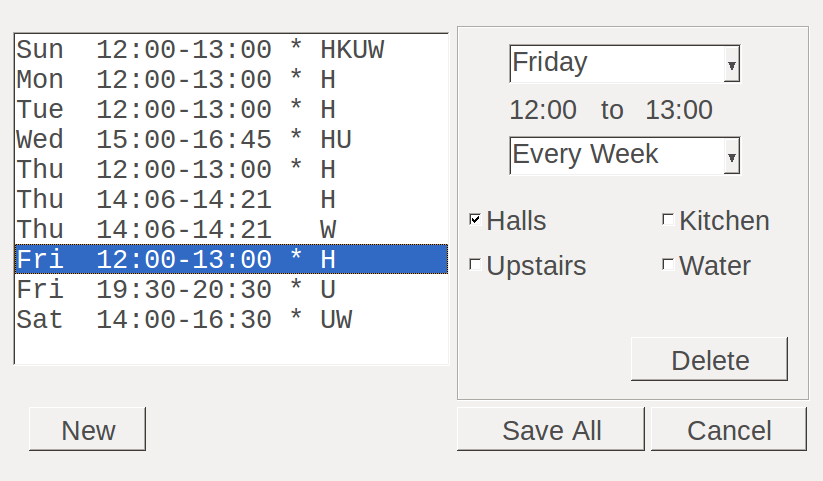
The next problem to solve was how to easily set programs. After a few iterations I came up with a dialog for that too, that is accessible from a settings icon on the main screen.

Programs can be added, removed or amended from this setting screen, which is designed to allow easy access to all programs. It could be made more beautiful, but as it will only be administrators who will have access to it, I don’t really want to put too much effort into the aesthetics.


Real Time Clock

Another difference in this location is that there is no internet access. The Raspberry Pi usually gets its time from the network, but it is possible to add a real time clock (RTC) module, which keeps a battery backup of the time. I bought a RTC module, and followed instructions on the internet to enable it, quite easy.

Network

There is no network in this location, however if I’m doing maintenance I don’t want to have to carry a network cable. I decided to set the Pi up as an access point (AP), and following instructions from the internet this turned out to be quite easy too. The Pi boots up into AP mode, which means if I scan for networks with my laptop I can join its network, and while there is no internet access, I can browse its folders via samba, and connect to the shell using ssh.

The lack of internet connection quickly posed problems, as there is no way to even install new modules. I decided to try setting my wireless temporarily as a client, and using my phone as an access point. Then I could visit the location with a laptop, connect the laptop and the Pi to the phone and they would be on their own private network. I initially hit a problem in that the HTC (or android) only routes data on certain ports, and ssh on port 22 wouldn't work. I quickly found that ssh could be configured on more than one port, so I set it to run on 443 as well, hoping that it would be routed, and this worked fine. The only problem is that the phone seems quite slow as a router, but at least it is an easy internet solution.


Hardware

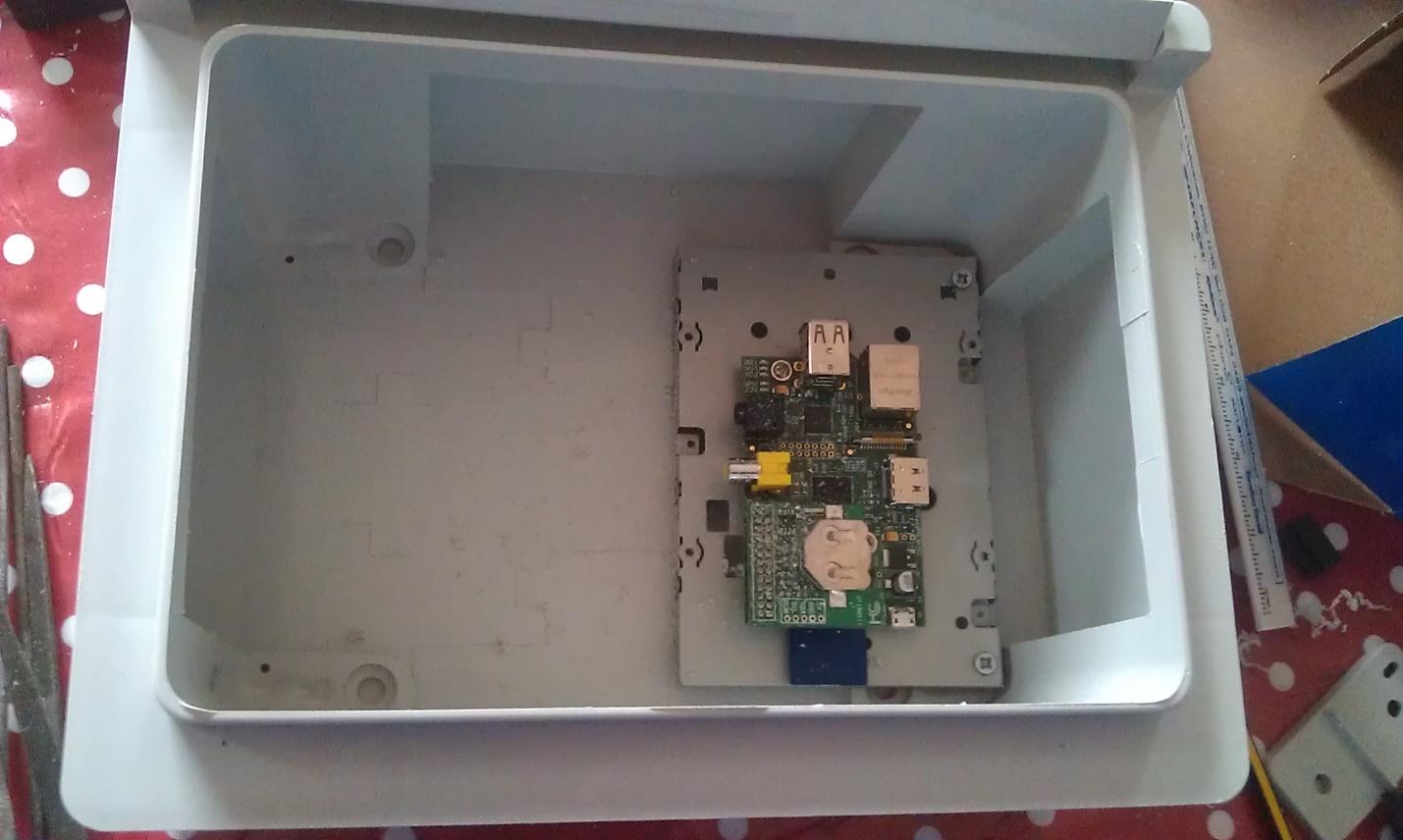
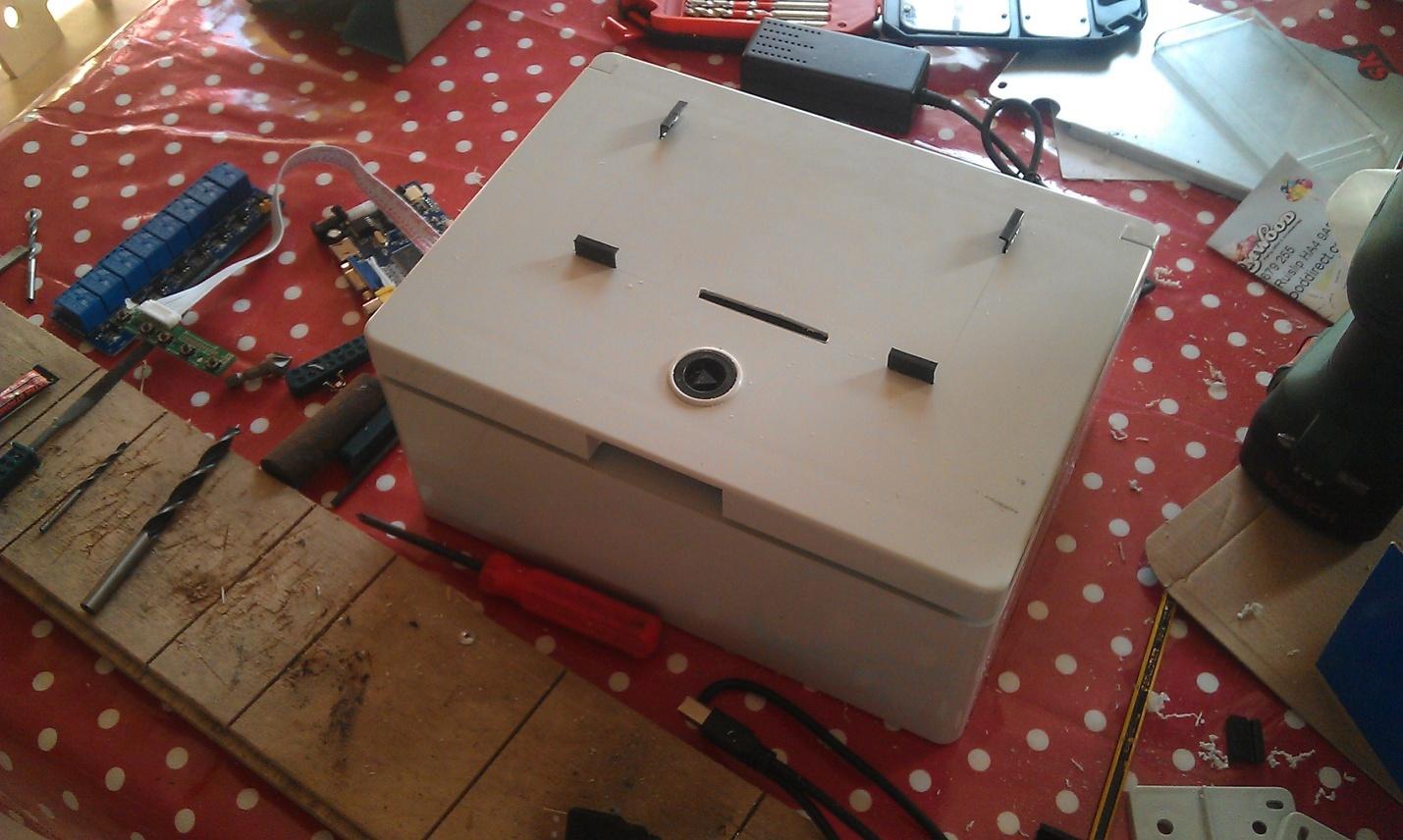
One of the challenges was to put the whole thing into a nice box. I asked a friend to look for a box for me, and he came back with an IP65 rated box that ended up being a great job. I used the metal part from some old floppy drives to mount the circuit boards on, and it made the inside of the box relatively tidy.


The screen was difficult to mount, as it seemed to be designed to fit inside a bezel. However, I found some old clips, and superglued them into slots in the box to make a mounting for the screen. This worked out quite neat, and I fed the ribbon cable from the screen and touchscreen overlay through slot to the controller boards which I mounted on the inside of the door.


Installed and running an initial revision of the software


Screensaver
By default the Raspberry Pi screen goes blank after 10 minutes, but the problem is that touching the screen to bring it on also activates whatever you touched. If someone touches the boost or off buttons, as well as bringing the screen on it would also perform the action. Installing xscreensaver (run xscreensaver-demo to configure it) solves this because after configuring it to go blank after 10 minutes touching it doesn't activate the buttons below. It is still a sub-optimal solution though as it doesn't switch the screen off, it only makes it go blank.

Mouse pointer
Touching the screen is exactly the same as clicking with a mouse. The problem is that this action moves the mouse pointer, which can often obscure the activated control. I found that a little utility called unclutter could help with this, hiding the mouse a few milliseconds after the click.

Conclusion
The system has been installed and running for about a week now, and initial feedback seems positive. However, the real test will be the longer term, where it will run many programs over many weeks, months and hopefully years. The Raspberry Pi seems like a capable little computer for this sort of task.